An AI prediction engine should make uncertainty inspectable.
MiroFish is an AI prediction engine for scenario rehearsal. It turns seed material into graph context, simulated perspectives, interaction rounds, reports, and follow-up questions.
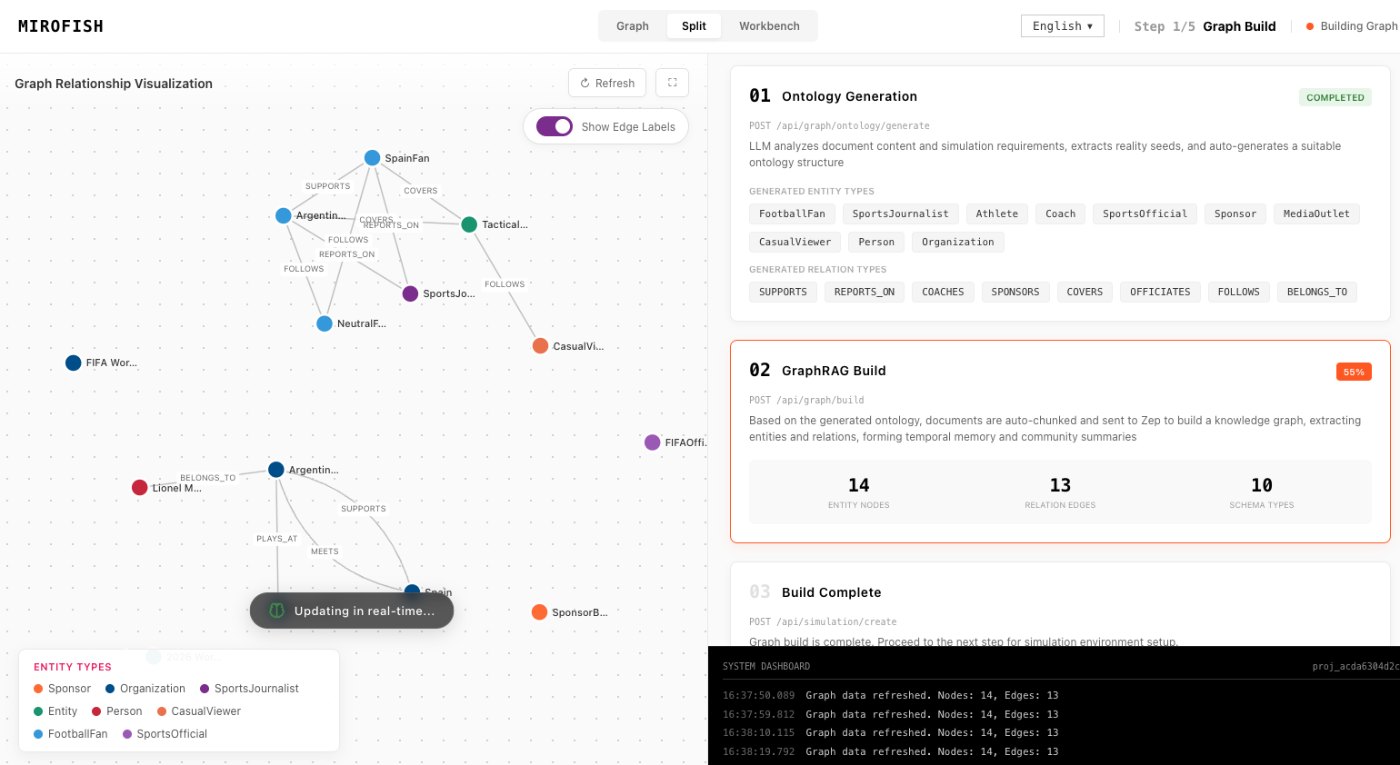
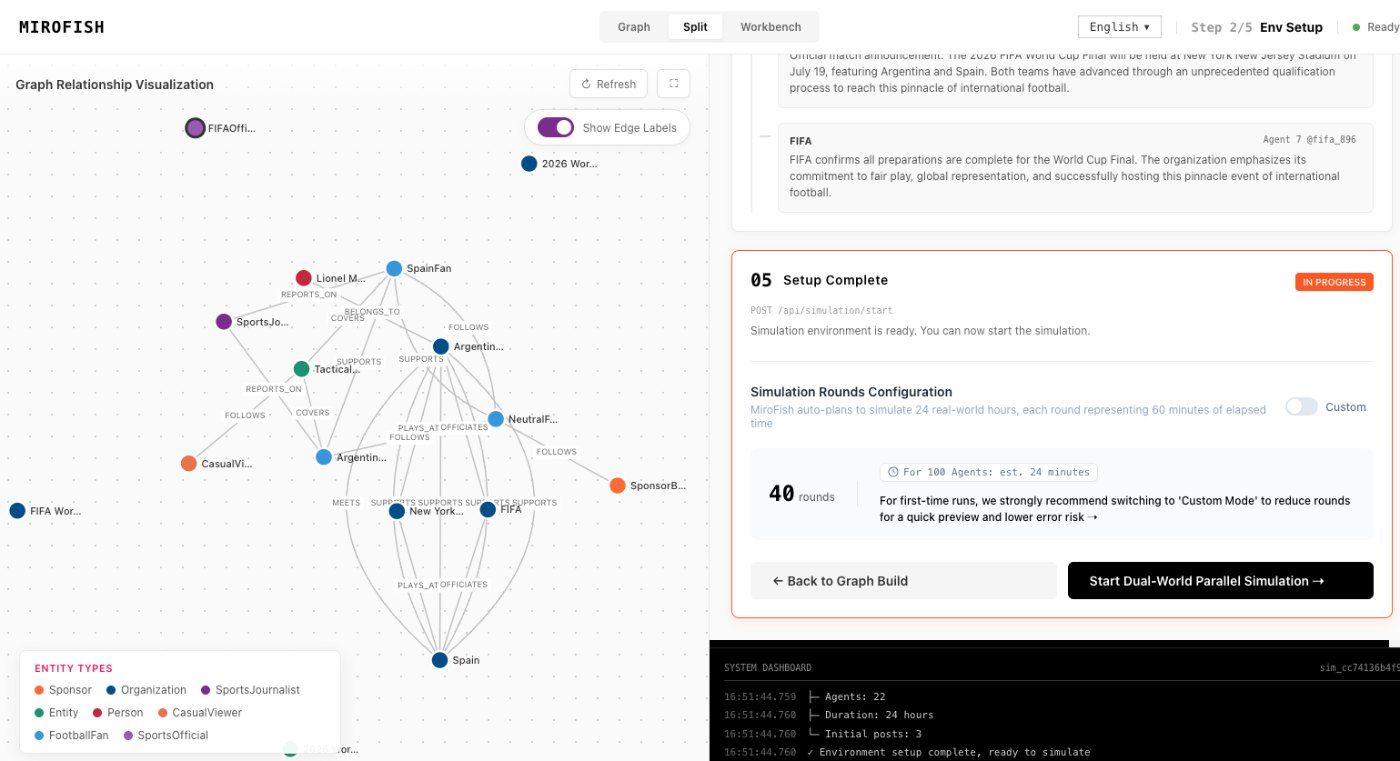
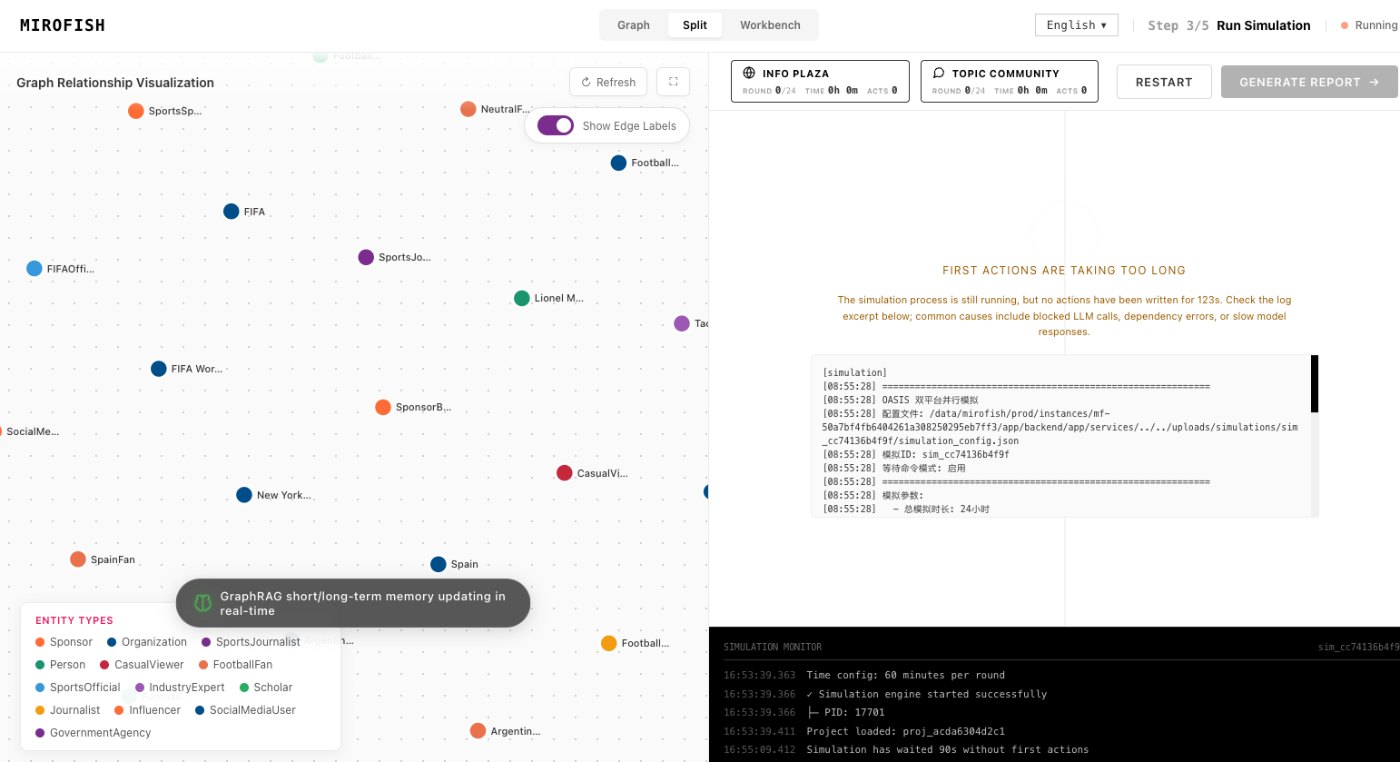
MiroFish simulation world setup used here to explain AI prediction engine.
1Focused reader question
3MiroFish product images from the notepad set
2:30Animated workflow walkthrough with input, graph, agents, simulation, and report
Direct answer
The phrase AI prediction engine can sound like a black box. MiroFish should be read differently: it is a workflow for organizing uncertainty, testing assumptions, and making plausible scenario branches easier to review.
The engine is useful when a decision depends on behavior, incentives, narratives, public reactions, or multiple stakeholders. It is not meant to replace direct measurement, expert review, or professional advice.
Turn your question into a reviewable scenario
Use these steps to move from an initial question to a scenario, report, or practical next action.
Seed -> graph -> agents -> report
Ground the engine
Upload seed material so the system has context beyond the prompt.
Build the graph
Extract entities, relationships, and claims before agents interact.
Run simulated perspectives
Let different roles respond to events and each other.
Review and rerun
Use the report to decide which assumption deserves a follow-up run.
Build a quick scenario worksheet
Draft the first MiroFish run on this page before opening a workspace.
Interactive worksheet
Prepare a useful first run
Think of the engine as a chain of inspectable stages rather than a single answer box. The first stage accepts a focused packet of source material. The second stage organizes entities, relationships, claims, and assumptions. The third stage lets role-based agents interact inside the bounded scenario. The final stage turns those traces into a report that a human can challenge.
This architecture matters because different failure modes live in different stages. If the source packet is weak, the graph may preserve the wrong facts. If the graph is cluttered, the agents may react to noise. If the personas are too similar, the report may miss disagreement. If the report hides uncertainty, the reader may treat a rehearsal as a forecast.
Use the engine when you need to reason about incentives and responses, not when you only need a current number. Good runs document the time horizon, actors, evidence quality, and verification tasks. Strong follow-up runs change one condition, preserve the original context, and compare what moved between reports.
A useful buyer or analyst also wants to know what the engine will not do. It should not invent live market data, issue professional advice, or make every branch look equally supported. The practical strength is traceability: the user can see the source packet, review the graph, inspect role reactions, and decide which outside evidence deserves attention before any action.
Evaluation should happen at each stage. Check whether the input is current, whether the graph separates facts from assumptions, whether the roles have different incentives, whether the run produced meaningful disagreement, and whether the final document exposes evidence gaps. Passing those checks matters more than producing a confident-sounding answer.
Review checklist
Before acting on a MiroFish output, check whether the scenario stayed inside the question you asked. The most useful output for this page is: A MiroFish prediction report with scenario paths, agent reactions, assumption notes, evidence gaps, and next-run prompts. The key limit is equally important: A prediction engine can organize uncertainty, but it cannot remove uncertainty. It should make assumptions easier to challenge.
Ground the engine. Upload seed material so the system has context beyond the prompt.
Build the graph. Extract entities, relationships, and claims before agents interact.
Run simulated perspectives. Let different roles respond to events and each other.
Review and rerun. Use the report to decide which assumption deserves a follow-up run.
What to compare in the output
Use these checkpoints to turn the first MiroFish result into a grounded next action.
Review before action
Seed input: Documents and scenario question. Grounds the engine. Clean noisy material.
Graph layer: Entities and relationships. Keeps context inspectable. Review before run.
Report layer: Findings and follow-up. Supports decisions. Verify externally.
Watch the full MiroFish workflow
This 2 minute 30 second animated walkthrough moves from source material through graph construction, agent activity, simulation events, report review, and follow-up questions.
2:30 animated walkthrough
Follow the full animated workflow, then use the page-specific checklist to prepare your own MiroFish run.
Product screenshots from the workflow
These images come from the notepad MiroFish image set and are used as concrete workflow references rather than decoration.
2 more images
MiroFish report generation workspace used as a concrete workflow reference.MiroFish follow-up analysis workspace used as a concrete workflow reference.
A realistic use case
A policy team can use an AI prediction engine to compare reactions from citizens, agencies, advocates, critics, and media before publishing a proposal. The output is a scenario review, not a final truth.
The value of the page is practical: define the job, prepare the right input, read the output with its limits visible, and choose a next step that can be checked outside the page.
How to read the report
Read a MiroFish report as a map of assumptions and reactions. Mark source-backed claims, uncertain claims, and follow-up questions separately. Then choose one change for the next run instead of accepting the first report as final.