Useful for launch, market, stakeholder, policy, public opinion, and narrative questions.
MiroFish review
MiroFish review: a practical check before you run a scenario.
MiroFish is strongest when a decision depends on reactions from different actors, uncertain narratives, and second-order effects. This review page helps you decide whether to start with MiroFish, what to inspect first, and where a simulation report should be treated carefully.
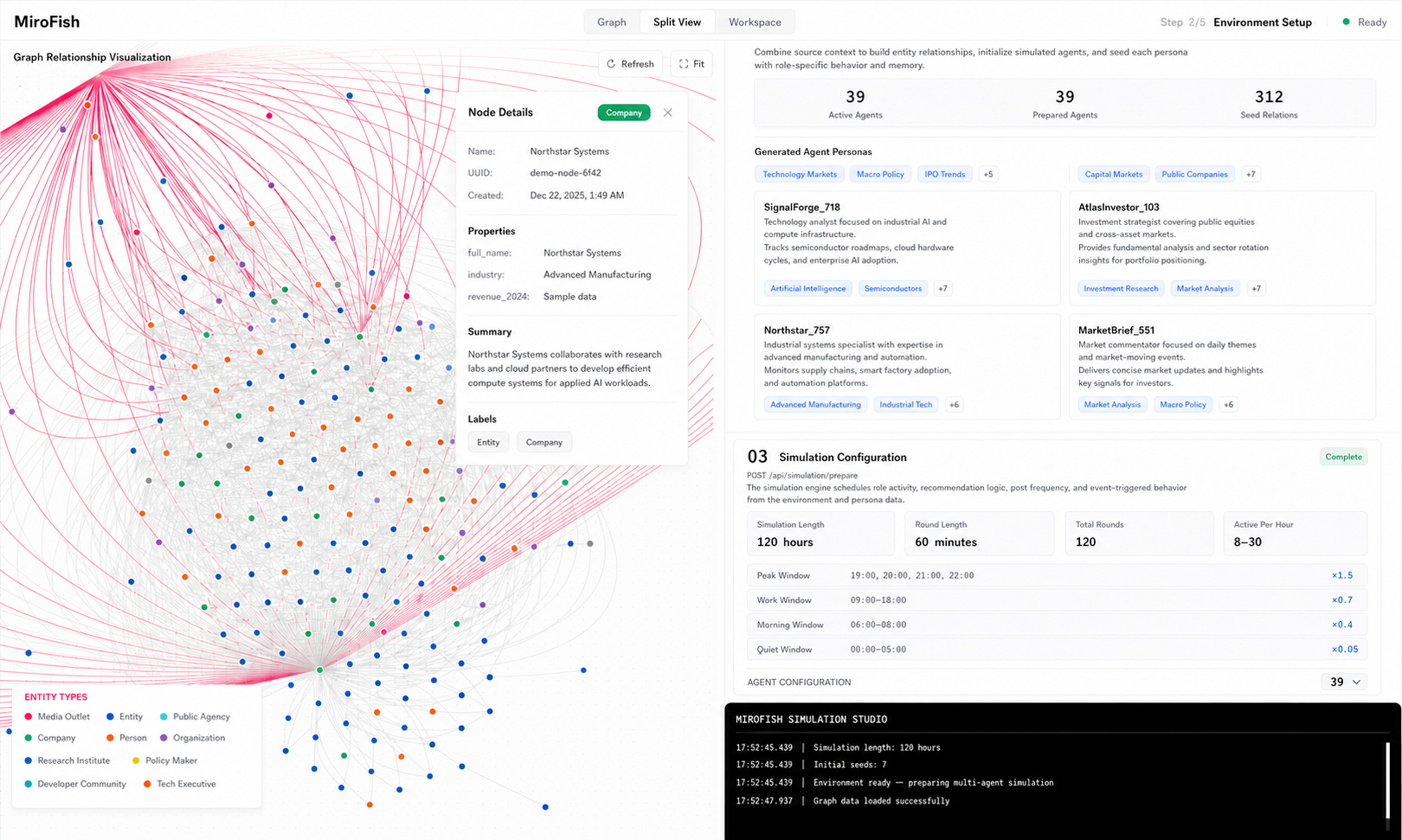
Use search, analytics, or a standard chatbot when the task does not need agent interaction.
The report is only as useful as the scenario framing and seed material you bring in.
Compare the two reports before relying on MiroFish for a larger decision.
Fit check
MiroFish review fit check: score your first scenario before you open the console.
Use this quick check when you are deciding whether MiroFish deserves a paid run. The best first scenario has real source material, named actors, a decision deadline, and at least one assumption you can rerun.
Write the first brief as a practical decision, not as a broad topic. Include the audience, the move you are considering, the reaction you worry about, and the real-world signal that would make you change course.
First-run brief
Use the review to make the first scenario narrow enough to judge.
A good trial run should produce a report you can disagree with, inspect, and improve. If the prompt only says "predict my market," the output will sound broad. If it names one decision, three actor groups, two sources, one deadline, and one outside check, the report becomes much easier to review.
Examples include changing a price, launching a feature, sending a campaign, publishing a statement, entering a niche, or choosing which stakeholder group to address first.
Bring customer notes, competitor examples, policy language, support tickets, survey fragments, or public reactions, and mark anything that is stale, narrow, or speculative.
Before upgrading or running a larger simulation, ask whether the actor motives feel real, whether one fragile source drives the branch, and whether the next outside check is practical.
Review scorecard
What to inspect before you pay for more runs.
A useful MiroFish review should look at the whole path: the setup, the source boundary, the agent behavior, the report, and the moment where a user decides whether to upgrade.
| Area | What good looks like | What to watch |
|---|---|---|
| Workflow fit | The question involves actors, incentives, reactions, disagreement, or a market/public narrative. | A direct lookup, calculator, or simple summary does not need multi-agent simulation. |
| Seed material | The input includes context, constraints, examples, known unknowns, and what decision is being tested. | Thin prompts can make the report feel confident while hiding weak assumptions. |
| Graph context | Entities, relationships, competing claims, and open questions are visible before the run. | If the context is wrong, rerun after editing the source packet instead of polishing the output. |
| Agent behavior | Different perspectives push back, disagree, converge, and expose second-order effects. | If every agent sounds the same, the scenario is probably under-specified. |
| Report quality | The report names likely branches, evidence gaps, risk signals, and follow-up questions. | A report is decision support, not certainty, investment advice, legal advice, or medical advice. |
| Cost control | You know whether the next run needs a larger plan, API access, or a one-off analysis pack. | Upgrade after a useful small run, not before you have checked the workflow. |
Hands-on test
A five-step first run is enough to judge the product.
Do not start with your biggest strategic decision. Start with one contained scenario, check the setup, and decide whether the report changes your next action.
Frame one decision
Name the decision, date, actors, constraints, and the outcome you want to pressure-test.
Add seed material
Use notes, market signals, customer quotes, briefs, articles, or meeting summaries.
Inspect context
Check whether the graph and agent setup match the real situation before running.
Read the report
Look for disagreement, turning points, assumptions, and what evidence is missing.
Rerun one change
Change one assumption and compare the new report against the first result.
Who gets value
MiroFish is most useful when the unknown is social, strategic, or narrative.
The product is built for decision rehearsal rather than a single answer. A good review should therefore judge whether it helps you see hidden reactions, not whether it pretends to know the future.
- Founders can test launch positioning, buyer objections, and investor response before sending the message.
- Product and growth teams can rehearse pricing, feature, campaign, and audience reactions.
- Analysts can organize competing narratives, catalysts, assumptions, and follow-up evidence.
- Creators and writers can test story-world logic, character incentives, and audience interpretation.
Trust checks
Use official paths and source review before entering sensitive context.
For any MiroFish review, keep account, payment, and source checks separate. This is especially important because unrelated pages may use similar names.
Hosted account path
Use the hosted login guide before signing in, upgrading, or returning to an old report.
Pricing path
Check free trial limits, monthly and annual plans, analysis packs, and API expectations.
Source path
Review the public repository and source notes when you need installation or self-hosting context.
Review FAQ
Short answers before your first scenario run.
These are the checks most users should resolve before deciding whether MiroFish belongs in their workflow.
Is MiroFish legit?
MiroFish has a public web product path, pricing, privacy and terms pages, and a public GitHub source path. Review those paths directly and avoid lookalike domains or pages that ask you to sign in somewhere unexpected.
Is MiroFish accurate?
MiroFish is not a guaranteed prediction engine. Review it as scenario rehearsal: the useful question is whether the report surfaces plausible branches, disagreements, and evidence gaps that improve your next decision.
Should I pay before testing it?
Start with a small scenario, read the report, and rerun one changed assumption. If the output changes your next action and you need larger or repeated runs, then compare pricing and plan limits.
What is the safest first scenario?
Pick a real but bounded decision: a launch message, pricing change, product concept, stakeholder reaction, market narrative, or public statement. Avoid private, regulated, or irreversible decisions as your first test.
Next step
Review one scenario with the smallest useful setup.
If MiroFish helps you see a reaction, objection, or hidden assumption you would have missed, it has earned the next run. If the first report is too shallow, improve the seed material before changing tools.